Build Processes
Building the KCWorks Container
The KCWorks and KCWorks-frontend containers are built automatically on every
push to Github or a PR is submitted to the main, staging, or production
branches. The build is triggered by the build.yml workflow.
.github/workflows/build.yml
If the push is to the staging or production branch, the build is pushed to
AWS Elastic Container Registry (ECR) as :latest, :$GITHUB_SHA, and
:v{pyproject-version}-{shortsha} (no automatic version bump; the pyproject
version is read as-is). The same images are also pushed to the
“monotasker/kcworks” Docker Hub repository under the branch name tag. After the
ECR push succeeds, the workflow updates the target ECS service to the newest
ACTIVE revision of the environment’s task-definition family
(kcworks-staging or kcworks) and forces a new deployment so running tasks
re-pull :latest. CI does not register a new task-definition revision.
Staging always updates kcworks-staging-blue on kcworks-staging-3.
Production picks among kcworks-blue / kcworks-green on kcworks-prod-2
(whichever has desired or running tasks; if both are up, blue is preferred for
blue-green pretest).
Sentry release steps are present in build.yml but commented out until the
matching GitHub secrets are configured.
If the push is to the main branch, the build will be tagged with latest and
pushed just to the “monotasker/kcworks” Docker Hub repository. If the build is
triggered by a push to a branch with a name that starts with dev/, the build
will be given a tag starting with dev- and pushed just to the
“monotasker/kcworks” Docker Hub repository. E.g., a push to the
dev/my-feature branch will be tagged with dev-my-feature and pushed to the
“monotasker/kcworks” Docker Hub repository.
Note
The local docker-compose.yml file is configured to use the “latest” container from Docker Hub by default. If you need to use a container build from a dev branch you can specify the image tag with the IMAGE_TAG environment variable. E.g., IMAGE_TAG=dev-my-feature docker compose up -d will use the container tagged “dev-my-feature”.
Building the Documentation
The documentation is built using Sphinx. The documentation source files are
located in the docs/source directory.
To build the documentation, run the following command:
sphinx-build -b html docs/source docs/build/html
This will build the documentation and save it in the docs/build/html
directory.
Note
The documentation is built automatically and published to the gh-pages branch when a change is pushed or PR is merged into the main branch.
Building JS, CSS, and Other Static Assets
InvenioRDM, the foundation for KCWorks, generally bundles its frontend asset file as part of its python packages. This means that the JavaScript and CSS (and .less and .scss files) cannot simply be installed as npm dependencies. They must be gathered from the python packages and built in a central location. Similarly, where those js files depend on npm packages, the various python packages can declare their own JavaScript dependencies, which must be included in that central build.
Build script and CLI commands
The full build process is handled in KCWorks by the scripts/build-assets.sh
script, intended to be run inside the web-ui container. This script handles
the following commands from InvenioRDM’s standard build process:
From the KCWorks source directory, the script runs the following commands:
Note
The invenio webpack commands are aliases for the flask webpack commands. These are defined by the flask-webpackext package. But InvenioRDM exposes all flask commands using the invenio prefix as an alias for the flask prefix.
1. invenio webpack collect -v
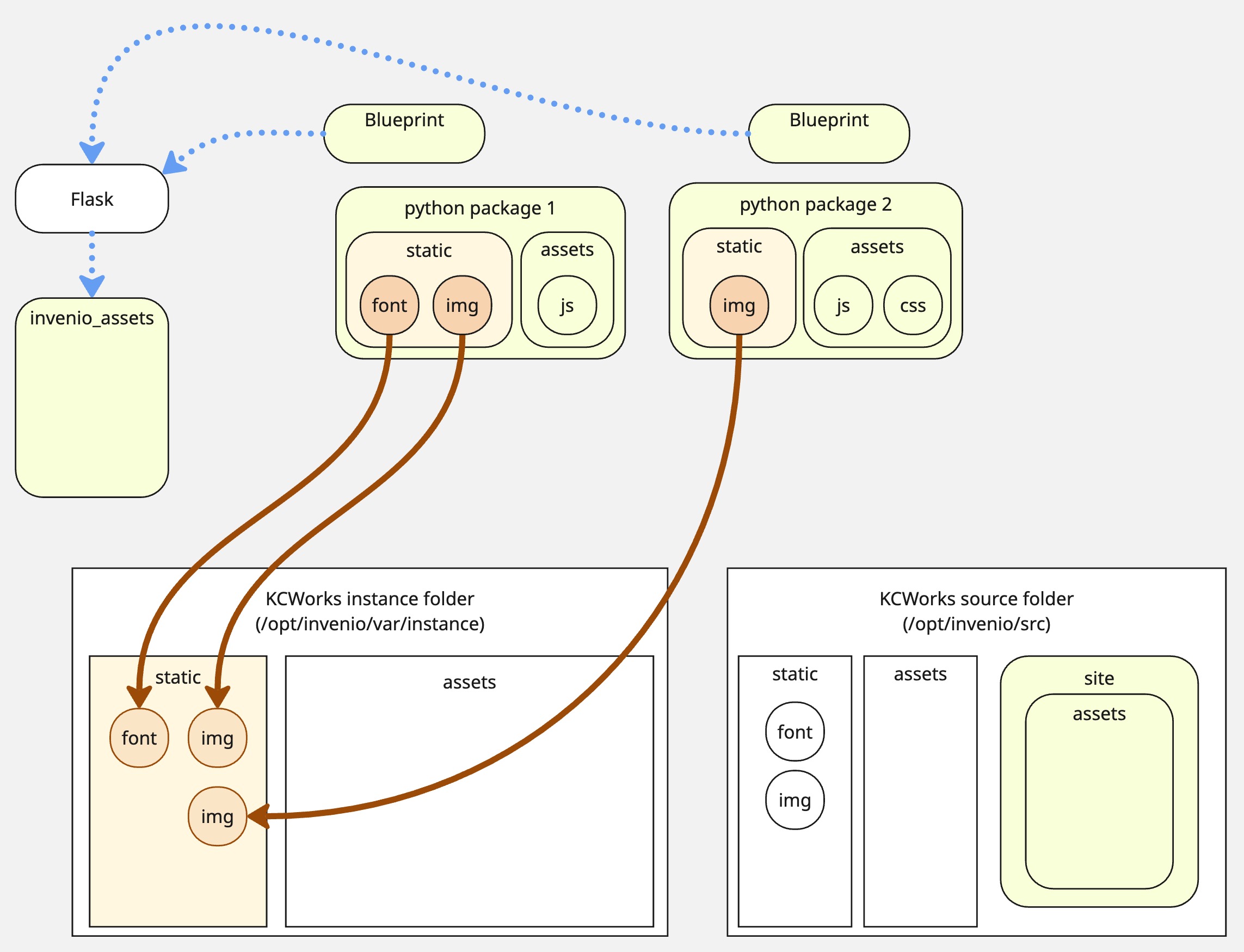
Gathers static files that don’t require building from the python packages, based
on the static files locations defined in the application’s blueprints. These
files are placed in the /opt/invenio/var/instance/static directory and are
exposed at the /static URL.
2. invenio webpack clean create
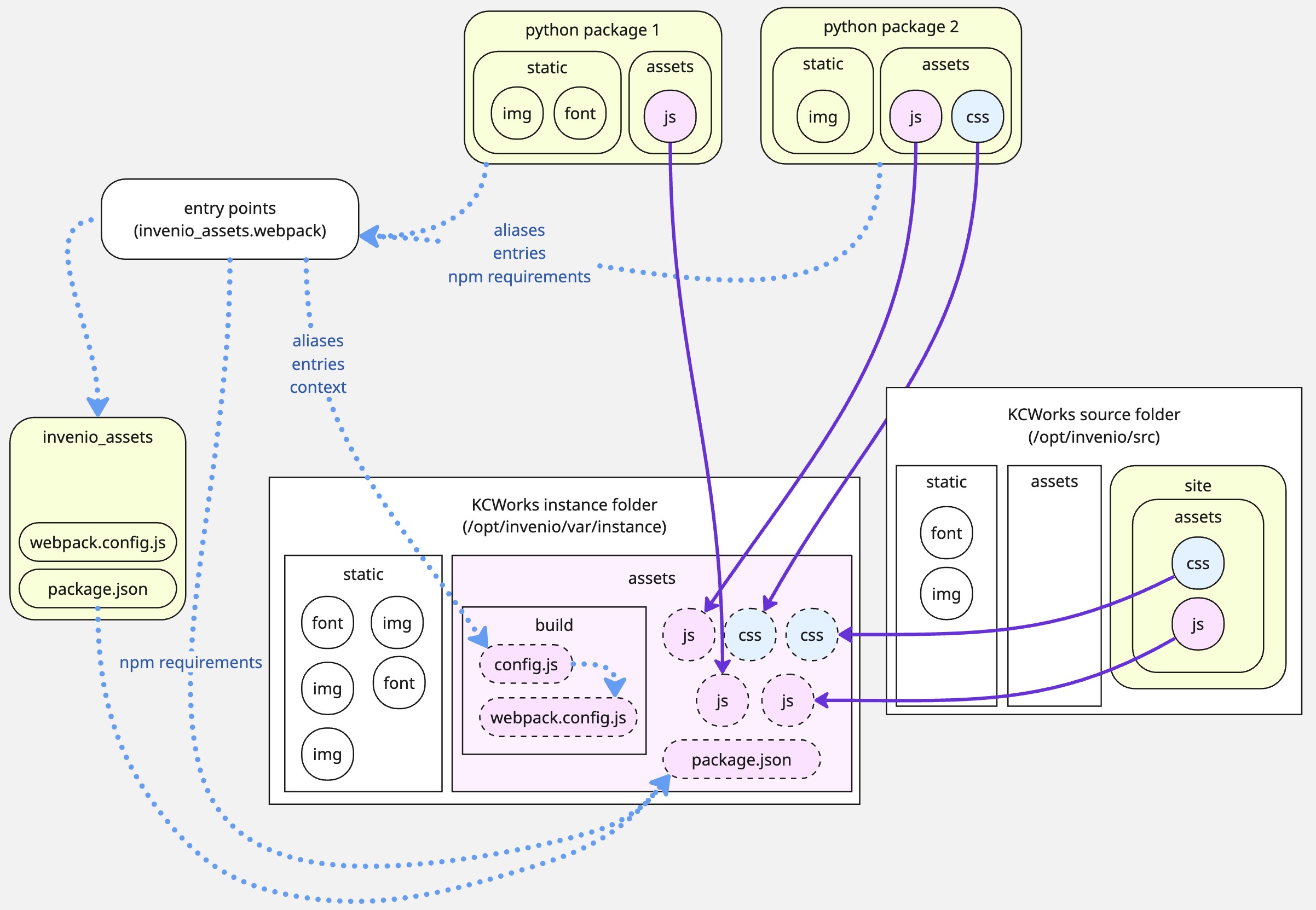
This performs four actions to set up for the build:
Deletes the existing built assets directory (
/opt/invenio/var/instance/static/dist).Copies all asset source files to the central Webpack build context directory (
/opt/invenio/var/instance/assets). This covers all of the files that need to be built by WebpackSymlinks the
webpack.config.jsfile supplied byinvenio-assetsinto the/opt/invenio/var/instance/assets/builddirectory.Generates a new
package.jsonfile in the top-levelassetsdirectory. This begins with the base package.json provided byinvenio-assetsand injects all of the additional npm dependencies declared in theinvenio_assets.webpackentrypoints.Creates a new
config.jsfile (in the/opt/invenio/src/assets/builddirectory) that can by imported by thewebpack.config.jsand provides Webpack withthe
buildcontext providing directory paths for the gathered source files (assets/build) and final built files (static/dist) as well as any other static files (static)the cumulative list of
aliasesthat allow Webpack to find files in the subfolders ofassetsvia../../less,@js, etc.the webpack
entrypoints, which are the files that will be built by Webpack. (Not to be confused with the pythonentrypointsdefined byinvenio_assets.webpack.)
(Under the hood these steps are all handled by pywebpack via
flask_webpackext and the WebpackBundleProject class.)
The clean subcommand instructs invenio-assets to delete the existing built
assets directory (/opt/invenio/var/instance/static/dist) and recreate it. If
you want to keep the existing build assets and simply copy into it, you can use
the create subcommand without the clean subcommand.
KCWorks then runs two post-create patches before install (see
scripts/build-assets.sh and the Dockerfile asset build):
scripts/patch-webpack-assets-pnpm-allow-builds.py— modern pnpmallowBuilds/strictDepBuildson the generated workspace file.scripts/patch-webpack-assets-tinymce.py— rewrite assembledpackage.jsontotinymce^8.9.3and@tinymce/tinymce-react^6.3.0. Upstream bundles still declare TinyMCE 6.x; declaring major 8 in a themewebpack.pywould fail pywebpack same-major merge. The site overlay aliasestinymce/tinymcetojs/kcworks/tinymceGplShim.jsso every bundled editor getslicense_key: "gpl"(required for self-hosted TinyMCE 8).
3. invenio webpack install
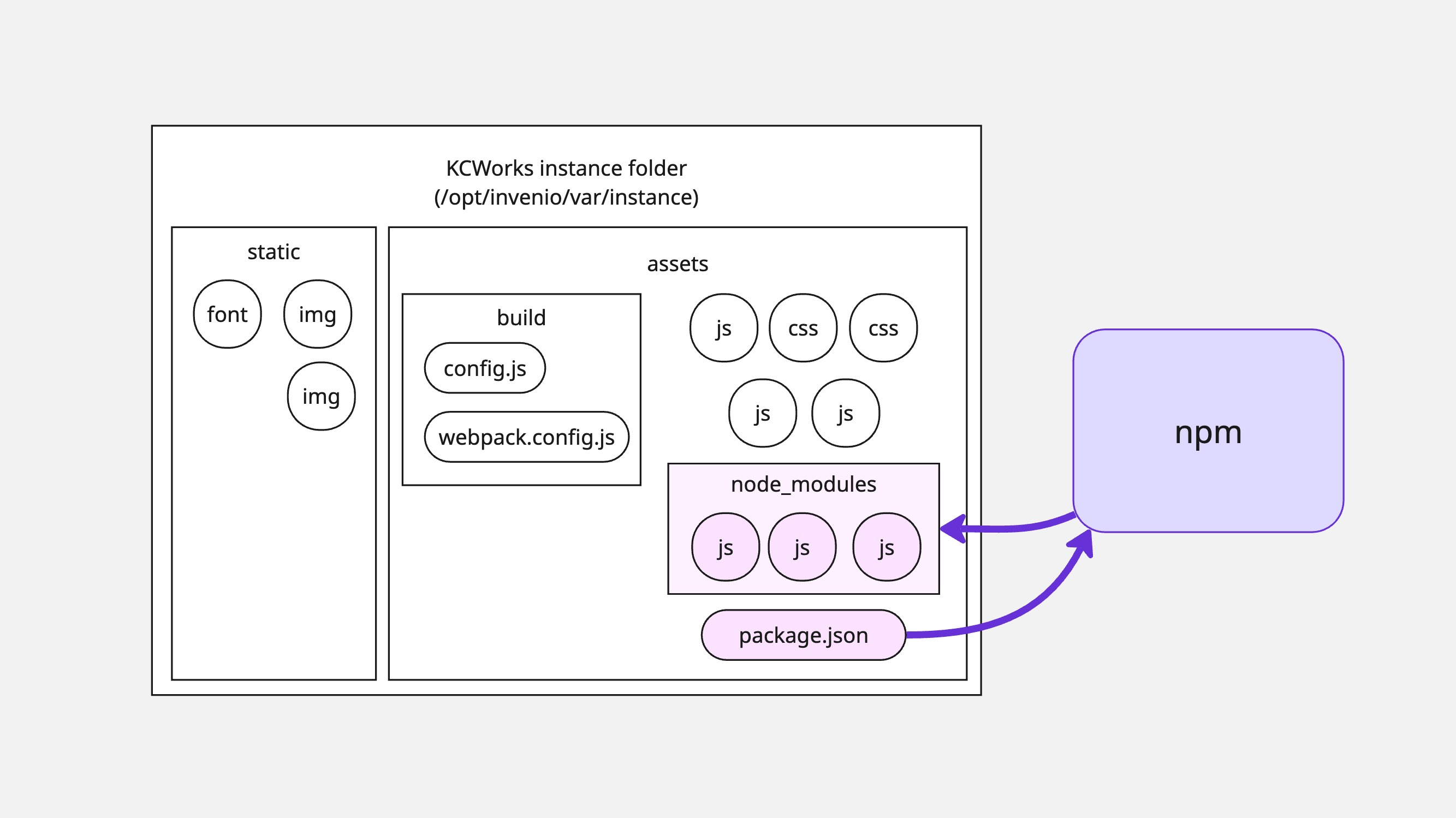
Runs the npm install defined in the newly assembled package.json file in
/opt/invenio/var/instance/assets. Dependencies are downloaded into
/opt/invenio/var/instance/assets/node_modules.
4. cd /opt/invenio/src && invenio shell /opt/invenio/src/scripts/symlink_assets.py
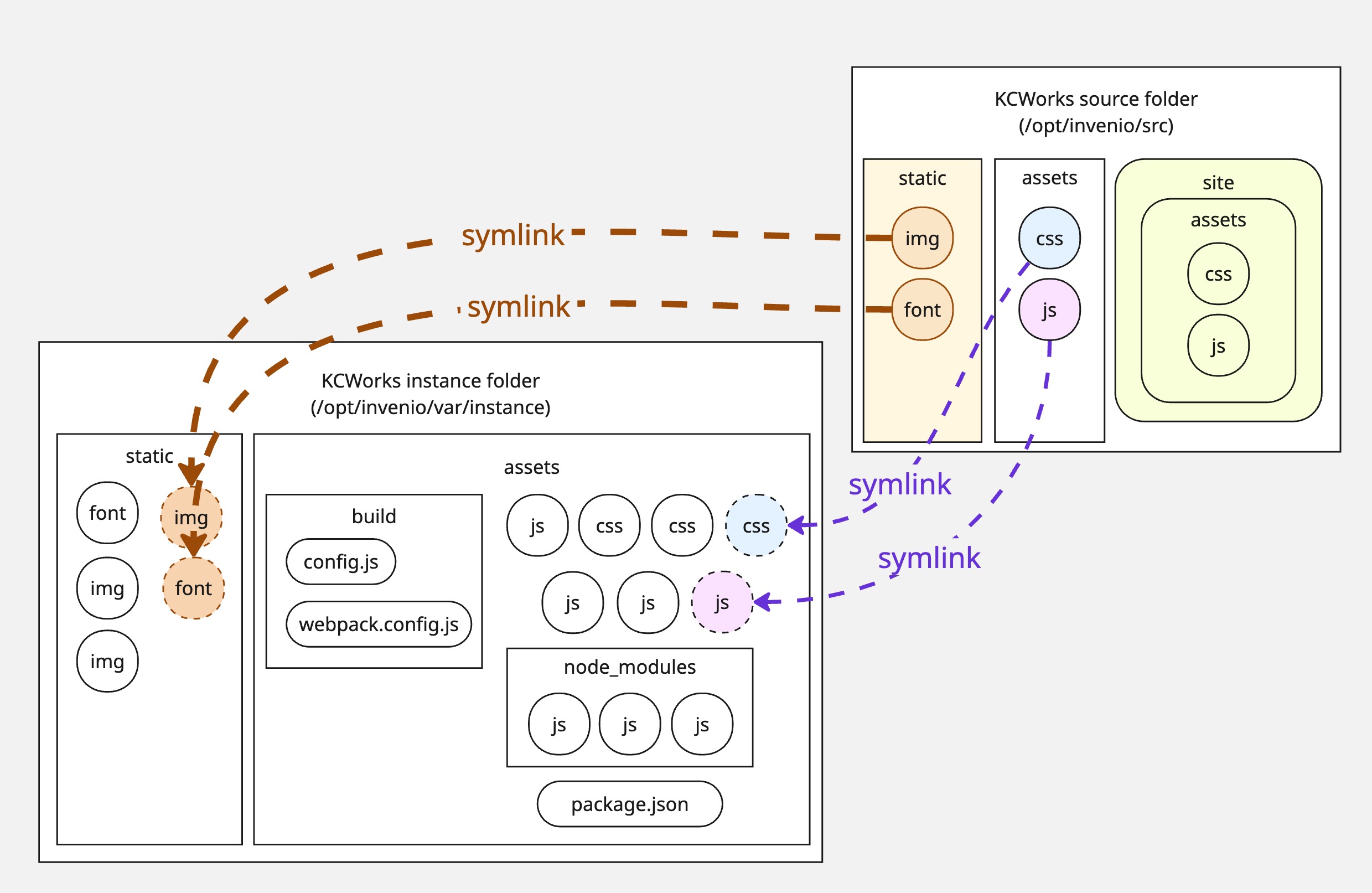
This symlinks all of the files in the source assets directory
(/opt/invenio/src/assets) to the /opt/invenio/var/instance/assets directory.
This includes all js, less, and scss files, as well as the translations
directory. These files are not included in the installable kcworks python
package, and so were not included earlier in the file discovery and project
assembly that flask_webpackext performs based on entry points.
5. invenio webpack build
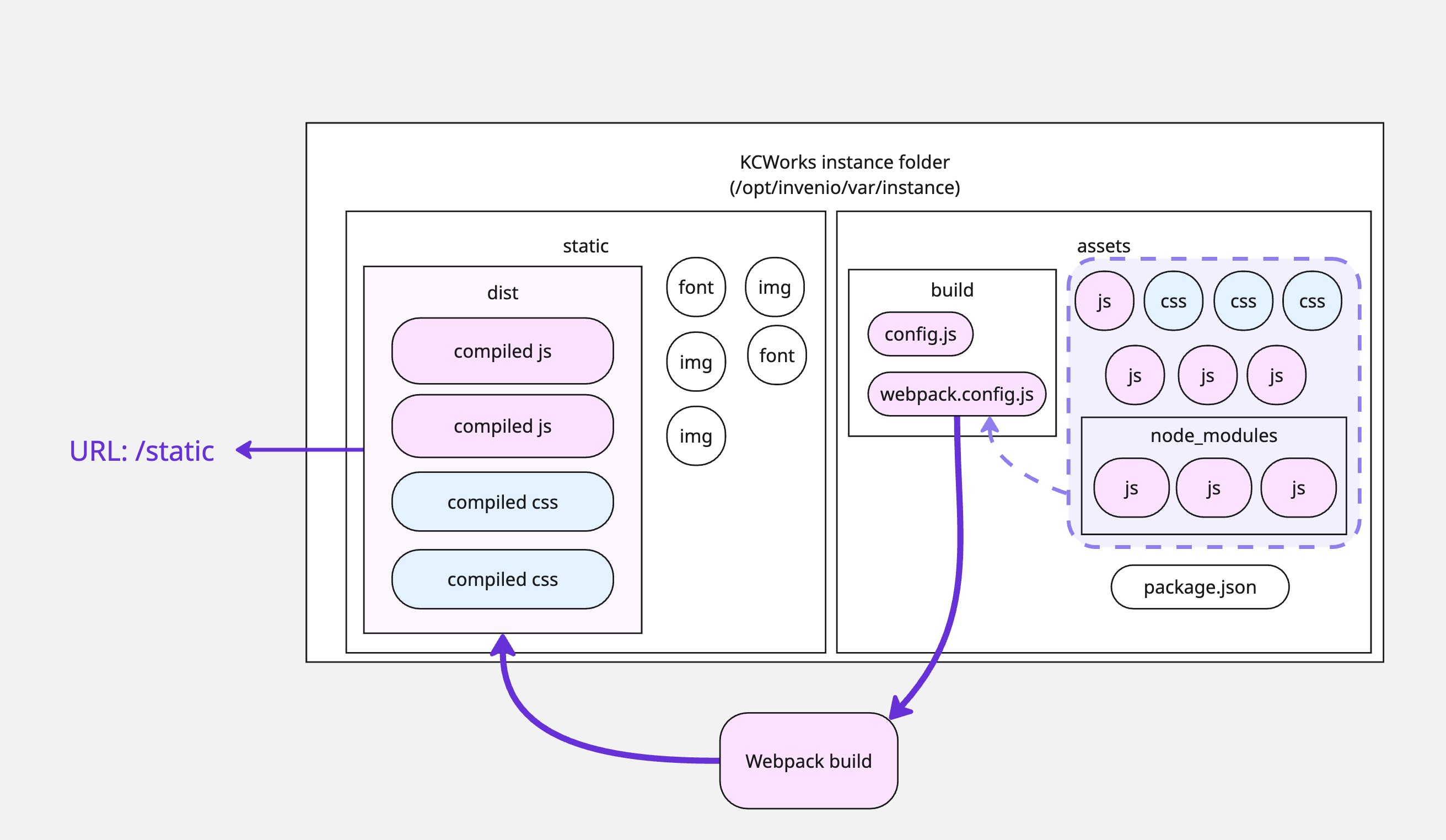
Runs npm run build command to execute the webpack command defined in the
package.json file. This builds the assets, placing the built files in the
/opt/invenio/var/instance/static/dist directory.
The actual webpack build command is:
NODE_PRESERVE_SYMLINKS=1 npm_config_report=1 NODE_ENV=production|development webpack --config ./build/webpack.config.js
The webpack.config.js in /opt/invenio/var/assets/build is the main config
file controlling Webpack itself, supplemented with aliases and entries from the
config.js file in the same directory. The build context (from config.js) is
set to /opt/invenio/var/instance/assets. The webpack command sets webpack
mode as either “production” or “development” based on the value of the
NODE_ENV environment variable.
The BundleTracker plugin in webpack.config.js writes the manifest file into
the /opt/invenio/var/instance/static/dist directory to tell Python where the
built assets are located.
The resulting dist folder, holding the compiled assets, is exposed at the
/static/dist/ URL.
Note
In vanilla InvenioRDM, the flask webpack buildall command is used to run the create, install, and build commands in sequence. It does not run the collect command, and does not run the script to symlink the development assets.
Watching files for changes
The package.json file in the assets directory includes the start script,
which will be triggered by flask webpack start and runs webpack with the same
config file but NODE_ENV=development. This will not minify the compiled
assets, leaving them readable and easier to debug. This will also spin up the
live reload plugin.
Key file locations
config.js file in
/opt/invenio/src/assets/build/built css and js files in
/opt/invenio/var/instance/static/dist/public url is
static/dist/
static css and js files (not needing build) in
/opt/invenio/var/instance/static/cssand/opt/invenio/var/instance/static/jspublic url is
static/css/andstatic/js/
webpack build context is
/opt/invenio/var/instance/assets/manifest.json is
/opt/invenio/var/instance/static/dist/manifest.json
Key python packages involved
invenio-assets
flask-webpackext
flask-collect
pywebpack